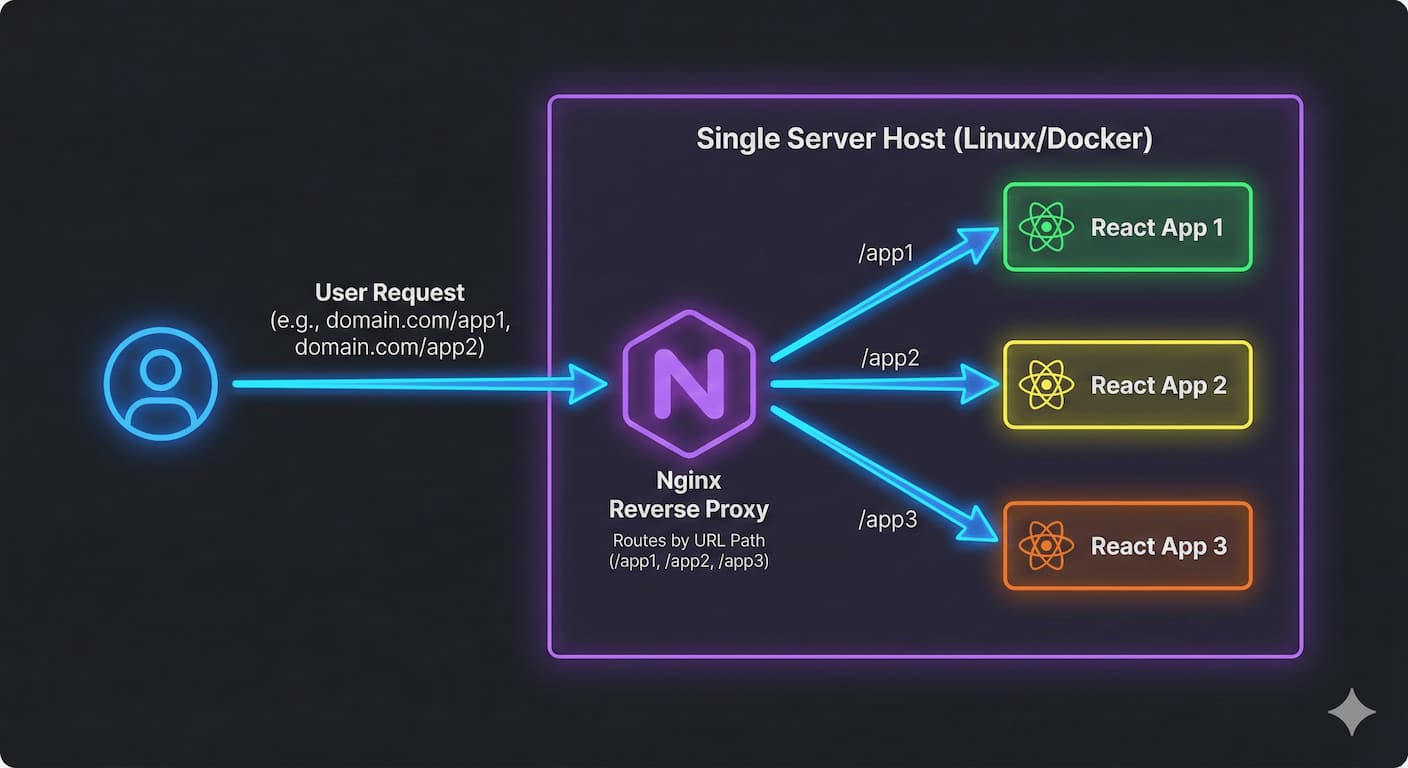
We are living in a new era of Fast development using GenAI. We Call it “Vibe Coding.”
I don’t write every line of code from scratch anymore. For my latest product, I used a Figma-to-Code plugin to generate a pixel-perfect Landing Page. I used an AI agent to build a complex User Dashboard. And I grabbed an open-source template for the Admin Panel.
The result? I had three separate zip files. Three separate tech stacks. Three separate package.json files.
The Problem: The Merge Nightmare
My goal was to present this to the user as One Single Product.
Naturally, I tried to combine them. I dragged the Landing Page code into the Dashboard’s src folder.
It was a catastrophe.
-
CSS Bleed: The Landing Page had a global
body { margin: 0; font-family: 'Inter'; }that completely destroyed the layout of my Dashboard. -
Dependency Hell: The Dashboard needed React 18. The Admin template was stuck on React 16. The Landing Page used a version of Tailwind that conflicted with everything.
-
The “Frankenstein” Monolith: I spent three days fixing webpack errors and zero days building features.
I realized that merging the code was impossible. But I didn’t need to merge the code. I just needed to merge the experience.
The Solution: The Gateway Architecture
I decided to stop fighting the tools. If the AI gives me three separate projects, I will keep them as three separate projects.
I architected a solution where the projects live in complete isolation on the server, never touching each other. To the user, however, they look like a single, seamless application.
I achieved this using Nginx as a Layer 7 Gateway. It acts as a traffic controller, routing the user to the correct independent application based on the URL path.
-
rohanprajapati.dev/serves the Landing Page -
rohanprajapati.dev/dashboardserves the User App -
rohanprajapati.dev/adminserves the Admin Panel
Here is the detailed breakdown of how I implemented this.
Phase 1: File Isolation
I abandoned the idea of a “monorepo.” Instead, I treated my server filesystem like a filing cabinet. Each AI-generated project gets its own dedicated folder in /var/www/.
Bash
/var/www/
├── marketing-site/      # The Figma Export (HTML/CSS)
├── user-dashboard/      # The AI Agent's React App (Dist folder)
└── admin-panel/         # The Template (Dist folder)
This immediately solved the conflict issues. I could delete the entire Marketing Site and upload a new design without risking a single line of code in my Dashboard.
Phase 2: The Nginx “Stitch”
The magic happens in the Nginx configuration. I used the alias directive to map specific URL paths to these isolated folders.
This is the exact configuration I used to glue them together:
Nginx
server {
    listen 80;
    server_name rohanprajapati.dev;

    # 1. The Landing Page (Root)
    # This handles the main domain traffic
    location / {
        root /var/www/marketing-site;
        index index.html;
        try_files $uri $uri/ /index.html;
    }

    # 2. The User Dashboard
    # Seamlessly loads the React app when user visits /dashboard
    location /dashboard {
        alias /var/www/user-dashboard/dist;
        index index.html;
        try_files $uri $uri/ /dashboard/index.html;
    }

    # 3. The Admin Panel
    # Loads the admin tools only on /admin
    location /admin {
        alias /var/www/admin-panel/dist;
        index index.html;
        try_files $uri $uri/ /admin/index.html;
    }
}
Note: The try_files line in the sub-locations is critical. It ensures that when a user refreshes the page while inside the React app, Nginx knows to serve the index.html file so React Router can take over.
Phase 3: The “White Screen” Fix
When I first deployed this, everything seemed perfect. The Landing Page loaded. But when I clicked “Login” to go to /dashboard, I was greeted by a blank white screen.
The Console was screaming 404 errors.
The Issue:
Modern frontend tools (like Vite, Next.js, or Webpack) assume your app is hosting at the root domain (/). The generated HTML was trying to load scripts from /assets/main.js.
But my dashboard wasn’t at the root. It was at /dashboard. Nginx was looking for those scripts in the Marketing folder!
The Fix:
I had to explicitly tell the build tool where the app would live.
For Vite Projects (Most AI Agents use this):
I opened vite.config.ts and added the base property:
TypeScript
export default defineConfig({
  base: '/dashboard/',  // This must match the Nginx location exactly
  plugins: [react()],
})
For Next.js Projects:
I opened next.config.js:
JavaScript
module.exports = {
  basePath: '/dashboard',
}
Once I rebuilt the projects with this setting, the apps knew to ask for /dashboard/assets/main.js. Nginx found the file, and the application sprang to life.
Phase 4: The Visual Stitch (The “Shell” Strategy)
Even with Nginx routing, navigating from /dashboard to /admin felt like a “hard” jump. The browser would refresh, and the UI would flicker. It felt like two different websites.
I wanted a “Super App” feel, where a single sidebar controls everything.
The Solution: Use the User Dashboard as a “Shell”
I turned the User Dashboard into the main container. I added a sidebar navigation that persists. When I click the “Admin Panel” link in the sidebar, I don’t redirect the browser. Instead, I load the Admin route inside an iframe.
Why this works:
-
CSS Isolation: The messy Admin template CSS cannot leak out of the iframe to break my clean Dashboard sidebar.
-
Seamless Nav: The sidebar never reloads. The user feels like they stayed in the same app.
-
Authentication: Since both run on
rohanprajapati.dev, they share the same cookies. Being logged into the Dashboard automatically logs me into the Admin panel.
Here is the React component I used in the Dashboard to “embed” the Admin panel:
TypeScript
// Inside User Dashboard Code
const AdminView = () => {
  return (
    <div className="w-full h-screen flex">
      <Sidebar /> {/* Persist this! */}
      <div className="flex-1">
        <iframe
          src="/admin"
          title="Admin Panel"
          className="w-full h-full border-none"
        />
      </div>
    </div>
  );
};
By setting the iframe src to /admin, Nginx routes that specific request to the Admin folder, while the outer “shell” remains the User Dashboard.
The Result
I now have a system that perfectly supports the “Vibe Coding” workflow.
I can generate a crazy new landing page design, zip it, and drop it into the marketing-site folder. The Dashboard remains untouched. The Admin Panel is securely contained inside an iframe, unable to break my layout.
To the user, it feels like one massive, cohesive product. To me, it’s three tiny, manageable, and isolated sandboxes. This is how you survive the era of AI-generated code.